Flight Tracker - Flight Radar
- 2.8
- Rating
- 5.00M
- Installs
- Free
- Price

 Analysis by App-foxy
Flight Tracker - Flight Radar caught my attention because it promises to turn a phone into a practical flight-monitoring tool rather than just another travel app. I tested it with the mindset of someone waiting for a friend, checking a delayed departure, or trying to understand what is happening at an airport without opening a full airline website. My first impression was that it is easy to approach: the purpose is immediately clear, the interface is centered on flight tracking, and the free entry point makes it simple to try.
That first-week appeal is real, but it does not automatically translate into a permanent place on my phone. A flight tracker is useful when I have a specific journey to follow; between trips, it can become an app I rarely open. My experience with this one is therefore mixed in a fairly practical way. It can be handy for checking a flight through radar-style information, yet it needs to fit a recurring routine before it feels essential. The key question is not whether it works for one travel day, but whether it remains useful after the immediate curiosity fades.
What the first week feels like
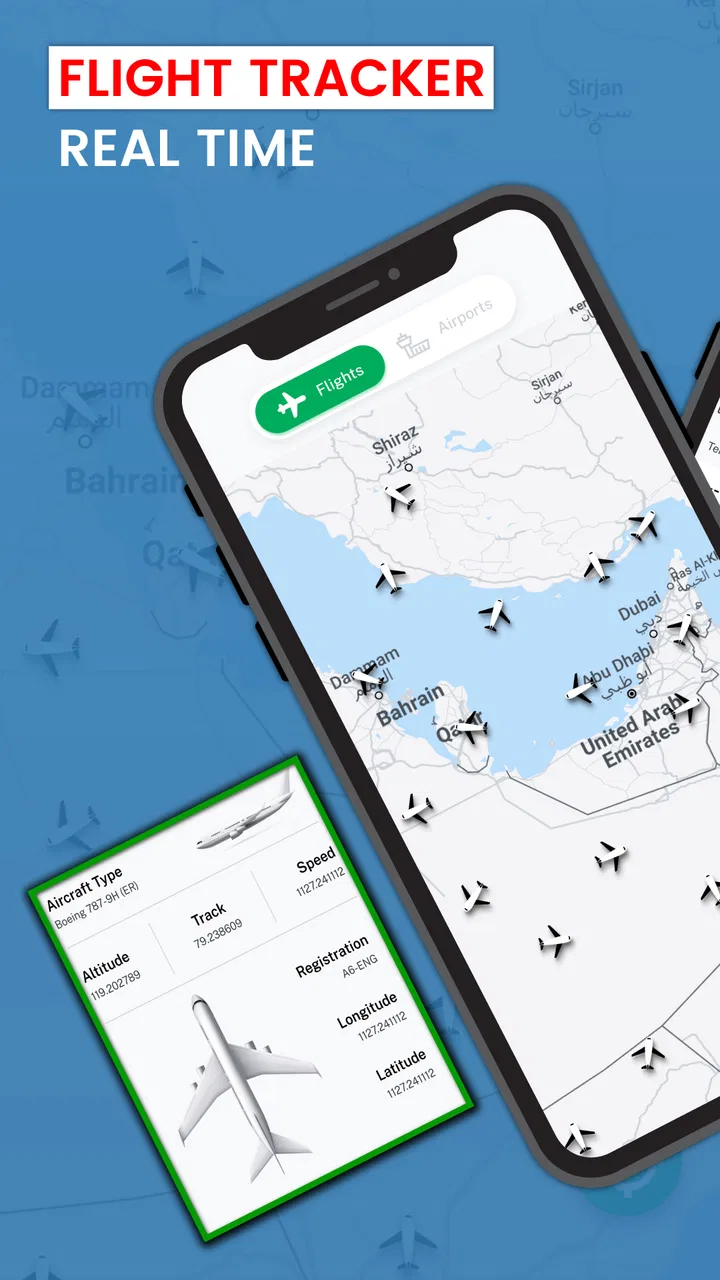
The app belongs to Maps & Navigation and is built around a straightforward idea: use a mobile screen to follow flights and inspect their status. I found that focus helpful because it avoids asking me to learn a broad travel-planning system before I can do the basic job. If I already know the flight I want to watch, the app has a clear reason to exist. It is also suitable for a quick check when I am away from a desktop computer and do not want to navigate several pages on an airline site.
You May Also Like

 Blood Strike: 2.5 Anniversary
Blood Strike’s Loadouts Turn Every Drop Into a Tactical Gamble
A close look at Blood Strike’s custom loadouts: how fast access to signature weapons reshapes its battle royale rhythm, rewards preparation, and narrows the gap between fights.

 Pandora - Music & Podcasts
Pandora’s Music Is Easy to Start, but Harder to Recover
Pandora’s strength is its low-effort path from a seed to a station. Its weak spot is how much confidence it asks you to place in connection, setup, and quiet recovery.

 8 Ball Pool
 Is Built on Rivalries, Rematches, and Routine
A close look at the rivalries, rematches, shared routines, and unanswered safety questions that turn a quick pool match into a persistent mobile community.

 Samsung Music
’s Quiet Strength Is Playing What You Already Own
Its reach comes less from spectacle than from dependable access to a personal library. That simplicity is both the app’s strongest retention engine and its ceiling.

 AccuWeather: Weather Radar
AccuWeather Review: A Quick, Clear Forecast for Everyday Decisions
For everyday plans, the best forecast is the one you can understand quickly. AccuWeather makes rain timing, radar, and local conditions easy to act on, with a few trade-offs.

 Hill Climb Racing
Why Hill Climb Racing Still Turns Crashes Into One More Run
A tiny car, a bumpy hill and one more upgrade: Hill Climb Racing keeps resurfacing because its simple chaos makes every near-miss feel personal.
More From Our News Desk



Its store short description is simply “Flight Tracker,” and that directness matches the experience. This is not an itinerary manager that tries to organize every part of a holiday. It is better understood as a compact status-checking companion. That distinction matters: I would reach for it to follow movement or check a flight, not to replace booking, airport maps, baggage guidance, or a complete travel organizer.
During the first few days, the most appealing use is the occasional check-in. I can imagine opening it before leaving home, checking whether a flight appears to be moving as expected, and then looking again while heading toward the airport. It is also useful for the person collecting someone. Instead of repeatedly asking a traveler to send updates, I can use the tracker as an independent reference and decide whether I need to leave immediately or wait a little longer.
There is another less obvious use: it can help separate travel anxiety from actionable information. People often refresh airline pages without learning anything new. A radar-oriented view gives the check a different purpose because I can look at the flight’s position or movement rather than only reading a status label. That does not eliminate uncertainty, but it can make a waiting period feel more structured. I would still treat official airport and airline notices as important, especially when a connection, gate, or cancellation is involved.
The app is free to install, which lowers the risk of trying it for a single trip. Its content rating is Everyone, so it is presented as suitable for a broad audience rather than a narrowly defined adult travel product. The developer shown for it is Airport Flights Status™, a name that clearly signals the app’s intended function. On my first impression, that narrow identity is more reassuring than a vague travel label because I know what I am opening it to do.
One practical tip is to test it before the day you actually need it. A travel morning is a poor time to discover that a tracking workflow does not suit you or that you prefer another source for a particular airport. I would search for a flight in advance, see how quickly I can return to it, and decide whether the information is readable enough for a hurried glance. This small preparation step is more valuable than installing several similar apps at the last minute.
Where it fits beside familiar alternatives
The usual alternatives are airline apps, airport websites, general map services, and broader travel platforms. An airline app normally has the advantage when I need booking details, boarding information, loyalty features, or official notifications tied to my reservation. An airport website may be better for terminal instructions, gate information, and local operational notices. A general map service is more useful when my real problem is reaching the airport or finding a pickup point.
This app makes more sense when my priority is a focused flight view. I do not have to treat it as my only source. In fact, the strongest workflow is to use it for quick monitoring and keep the airline or airport source available for decisions that carry consequences. If I am collecting a relative, for example, the tracker can help me judge timing, while the airport’s own information remains the place I would check for terminal changes.
That division of labor is one of the first-week lessons. The app is not automatically better than every alternative; it is more convenient for a particular slice of the travel problem. People who want one all-in-one travel dashboard may find it too narrow. People who only need a simple way to watch a flight may appreciate that narrower purpose.
Whether it earns monthly space
After the novelty of watching a flight wears off, the value becomes dependent on how often I travel or support someone else’s travel. Frequent travelers can create a natural habit: check before departure, check during a delay, and check before heading to an airport. Families with children studying or working away from home may also find a recurring reason to use it when they want a quick view of an arrival.
For an occasional traveler, the pattern is different. I might install it for one journey, use it intensely for a few hours, and then forget it exists. That is not necessarily a failure; some tools are valuable precisely because they solve a temporary problem. Still, I would not keep it permanently just because it is free. An app deserves long-term space when it reduces repeated effort, and a flight tracker will not do that for someone who takes only one or two flights in a long period.
The app has reached more than a million installs, which suggests that the basic idea has attracted a substantial audience. At the same time, its average rating is 2.3 from around four thousand ratings, so I would not interpret popularity as proof of a smooth experience for everyone. The rating is an important warning to keep expectations measured. I would install it because the use case fits me, not because the install count alone settles the decision.
Its current version is 1.4.3, and the release date shown is November 9, 2022. Those details make maintenance part of my judgment. A flight tracker depends on timely, dependable information, so I care less about novelty than about whether the app continues to feel reliable over repeated trips. A tool in this category has to justify trust every time I open it, especially when I am making plans around a departure or arrival.
One useful long-term habit is to avoid using the app as a single point of truth. I would compare an important status with the airline or airport, particularly before leaving for the terminal. This is not unnecessary duplication; it is a sensible trade-off. The tracker may be convenient for a broad view, while the official source is generally the better place to confirm operational details that affect my reservation.
Another practical workflow is to use it for coordination rather than constant surveillance. If I am picking someone up, I can check at sensible intervals and adjust my departure time. Refreshing continuously can create fatigue without improving the outcome. The app is more valuable when it helps answer a concrete question—“Should I leave now?”—than when it becomes a screen I stare at throughout the day.
What makes continued use harder
The main maintenance burden is not complicated setup; it is remembering to keep the app in the right role. Because flights are occasional events, the app may sit unused for weeks. When I return to it, I need to re-establish the exact flight I care about and confirm that the information is current enough for my situation. That makes it less habit-forming than a navigation app I use every day.
There is also a financial consideration. Although the app is free, it includes in-app purchases priced from $9.99 to $39.99 per item. That range changes how I evaluate the free experience. I would begin without paying and only consider an upgrade after using the app during a real trip, when I could identify a specific problem that a paid option solves. Paying in advance, before understanding my actual usage, would be difficult for me to justify.
The best way to manage that choice is to treat the free version as a trial of the entire workflow, not merely as a preview. I would ask myself whether I can find the flights I need, interpret the information quickly, and rely on the app as a convenient secondary source. If those basics do not work for me, a purchase is unlikely to transform the app into a lasting tool. If they do work and I travel often, the cost becomes a personal value decision rather than an automatic recommendation.
Device compatibility is also worth checking before relying on it. The app requires Android 7.0 or later, so it is accessible on many older Android phones but is not suitable for devices below that requirement. For someone using an older handset as a dedicated travel phone, this could be the deciding practical detail. I would install and test it on the actual phone I plan to carry, rather than assuming that a primary phone and a backup phone will behave identically.
Where fatigue starts to appear
Flight tracking can become repetitive quickly. The first radar-style view may feel engaging, especially when I am following a plane connected to someone I know. After several checks, however, the information may not change my decision. This is the app’s biggest source of fatigue: it can invite attention without always offering a new action. I prefer using it in short sessions, tied to departure, delay, arrival, or pickup planning.
The low average rating reinforces my caution here. I would not assume that every user will experience the same friction, but a rating of 2.3 tells me to test the core workflow rather than forming an opinion from the store summary. If the app feels slow to understand, unclear during a delay, or less dependable than the official source I already use, the novelty disappears quickly.
There is a subtle emotional trade-off too. Watching a flight on a map can be reassuring, but it can also encourage overchecking. A moving icon does not necessarily answer whether a connection will be protected, whether baggage will arrive, or whether a gate will change. I found it healthier to use the display as context and then return to the information that actually affects my next step.
For that reason, I would skip this app if I need guaranteed operational guidance, detailed booking management, or a complete airport companion. I would also skip it if I dislike maintaining several travel tools and already have an airline app that gives me everything I need. The dedicated tracker is most convincing when its focused view adds something I cannot get as quickly elsewhere.
My long-term verdict after the initial appeal
Flight Tracker - Flight Radar is a reasonable app to try when I want a focused way to monitor flights and I am comfortable treating it as a supporting tool. Its free installation makes a one-trip experiment easy, and its purpose is clear enough for friends, relatives, and travelers who want a quick status check without committing to a larger travel platform.
My recommendation is more selective for permanent use. I would keep it installed if I regularly track other people’s journeys, travel often, or genuinely prefer a radar-style view to the airline’s simpler status page. I would remove it after the trip if my travel is rare or if the official airline and airport tools already cover my needs. Its lasting value comes from a repeatable travel routine, not from the excitement of watching one flight move across a map.
The in-app purchase range also means I would resist upgrading until the free experience has proved useful over more than one situation. The app’s broad audience rating and Android 7.0 requirement make it approachable, but the modest average rating means I would test it with realistic expectations. I would not depend on it alone for a time-sensitive airport decision, and I would keep official sources close for final confirmation.
In the end, I see it as a practical secondary monitor rather than a complete travel command center. It earns a place for the person who needs quick flight awareness and can use that information without overchecking. It does not earn permanent space from me purely because it is popular or free. Once the first-week curiosity fades, the deciding factor is simple: if it saves me repeated searching during real journeys, I keep it; if it only gives me something interesting to watch, I move on.
FAQs for Flight Tracker - Flight Radar
01What features does Flight Tracker - Flight Radar offer?
Flight Tracker - Flight Radar provides real-time flight tracking with detailed maps. Users can access flight statuses, routes, and historical data. The app also offers airport information, including terminals and gates, and alerts for flight changes. Additionally, it includes weather updates, ensuring travelers stay informed.
02Is Flight Tracker - Flight Radar free to use?
The basic version of Flight Tracker - Flight Radar is free, offering essential tracking features. However, there is a premium version available via in-app purchases that unlocks more advanced features, such as no ads, more detailed flight data, and additional customization options for frequent travelers.
03How accurate is the flight data provided by the app?
Flight Tracker - Flight Radar is known for its high accuracy, using real-time data from various aviation sources. However, users should note that occasional discrepancies can occur due to factors like data transmission delays or changes made by airlines that aren’t immediately reflected in the app.
04Can Flight Tracker - Flight Radar be used offline?
While Flight Tracker - Flight Radar requires an internet connection for real-time data, some features like saved flight data and airport information can be accessed offline. However, for the most accurate and current information, a stable internet connection is recommended.
05Is Flight Tracker - Flight Radar available for both Android and iOS?
Yes, Flight Tracker - Flight Radar is available for download on both Android and iOS platforms. Users can find it on the Google Play Store for Android devices and the Apple App Store for iOS devices, ensuring a wide range of compatibility with smartphones and tablets.
Pros
- Real-time flight updates are highly accurate.
- User-friendly interface with intuitive navigation.
- Covers a wide range of airlines globally.
- Customizable notifications for flight status.
- Detailed airport information available.
Cons
- Frequent ads can disrupt user experience.
- Premium features require a subscription.
- Some minor bugs in map loading.
- Limited offline functionality.
- Battery consumption is relatively high.

Flight Tracker - Flight Radar
Gallery